13 August 2026
Syntax highlighting of sessions with TeXmacs
I like TeXmacs, even if I encounter difficulties with its configurability.
I finished writing the theological book I mentioned in the previous blog entries.
I continuously updated the GitHub repo that contains the whole book.
In this blog entry I summarize my technical experiences, the biggest challenges, and possible solutions.
Not all problems have already been solved yet: displaying ␣ instead of invisible space in string
contexts is still an issue to address.
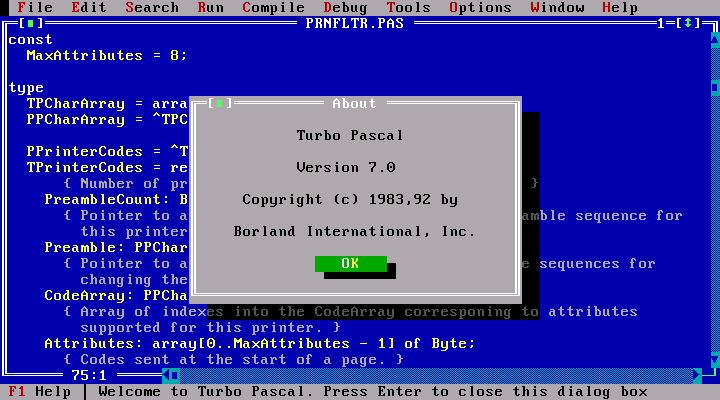
Syntax highlighting of a computer program is a typical task nowadays. My first experience with syntax highlighting
was back in 1992: Borland introduced Turbo Pascal 7.0. This was the first time for me when I felt: it makes a difference
in coding.
When printing a book, however, there may be restrictions. Black-and-white books are obviously cheaper than books with colors.
And technically, one needs to have a reliable way to color the program code automatically. A well-known standard is
LaTeX's listings package. TeXmacs's session-oriented text processing
approach is somewhat different and has nothing to do with LaTeX packages.
TeXmacs is written in C++ but its configuration is mostly based on Scheme
scripts. Unfortunately, there is only one supported
language with session integration, Python, and the documentation on how to add support for other languages, is incomplete.
For me, it took several months to figure out how a new language can properly be added, because I assumed that
everything works out-of-the-box. In reality, TeXmacs seems to be a discontinued project by its creator
Joris van der Hoeven,
even if there is still official support that provides new releases. (I know, this is not completely
true since Joris still contributes a lot to the source code and there are several commits done by himself.
But my final user experience is that this project receives much less spotlight than earlier.) In fact, a new
project Mogan seems to take over the lead by fixing several
issues and improving many features. It is, however, still in beta stage in several aspects: for example,
its EPS support is partially broken and my book (that works perfectly in TeXmacs) cannot be properly loaded
in Mogan. Unfortunately, most part of Mogan's development is contributed by Chinese developers and some
improvements are commented in Chinese – this makes non-Chinese contributions difficult. Also, my
help requests at Mogan's Discord channel were not completely answered – my final conclusion is
that I cannot count on anybody who knows the source code well enough so I need to go ahead alone.
I did so, and with a little help given by ChatGPT, I managed to fix some issues on my own. (ChatGPT had also
difficulties with the code and I really needed my own creative approach and perseverance to address the issues.)
One of the biggest challenges for me was to learn how to compile TeXmacs and have a local version that
contains eventual changes according to my feature requests. The most difficult part was to compile
guile
that works together with TeXmacs. It turned out that TeXmacs requires its
own fork of guile, and one needs
to have gcc-12 to compile it. This package is available
in all recent Ubuntu versions. To enable syntax highlighting, however, it was not required to recompile TeXmacs.
Steps one needs to do for syntax highlighting
Assume we want syntax highlighting for a new language, say
newlang. We need to create the folder
~/.TeXmacs/plugins/newlang/progs/ first. This folder is mainly for Linux users, for other platforms this may be different.
In this folder we need to put three files: newlang-format.scm with the content
and another file newlang-lang.scm with the minimal example content
and the third file init-newlang.scm with something like this:
This last line was crucial and it took me several months to figure out. Usually it already appears in the system-wide startup script progs/init-texmacs.scm for the already working languages like Python.
(texmacs-module (newlang-format))
(define-format newlang (:name "newlang source code"))
and another file newlang-lang.scm with the minimal example content
(texmacs-module (newlang-lang) (:use (prog default-lang)))
(tm-define (parser-feature lan key)
  (:require (and (== lan "newlang") (== key "keyword")))
  `(,(string->symbol key)
    (keyword "print" "if" "and" "other" "keywords")
    (keyword_control "more")
    (constant_module "etc"))) ;; and so on...
(define (notify-newlang-syntax var val) (syntax-read-preferences "newlang"))
and the third file init-newlang.scm with something like this:
(plugin-configure newlang
  (:require (url-exists-in-path? "newlang-cli"))
    ;; here newlang-cli is an interpreter (executable) for newlang
  (:launch "newlang-cli")
  (:session "newlang"))
(lazy-format (newlang-format) newlang)
This last line was crucial and it took me several months to figure out. Usually it already appears in the system-wide startup script progs/init-texmacs.scm for the already working languages like Python.
To enable this only for session inputs but not for session outputs and session errors, we
need to create the file ~/.TeXmacs/plugins/newlang/packages/session/newlang.ts with some minimal content like
I used Joris' .ts file for Python with technically no modification.
<TeXmacs|1.99.19>

<style|source>

<\body>
  <active*|<\src-title>
    <src-package|newlang|1.0>

    <\src-purpose>
      Markup for newlang sessions.
    </src-purpose>

    <src-copyright|2026|Your Name>

    <\src-license>
      Some license
    </src-license>
  </src-title>>

  <\active*>
    <\src-comment>
      Use verbatim output
    </src-comment>
  </active*>

  <assign|newlang-output|<\macro|body>
    <\with|mode|text|language|verbatim|font-family|tt>
      <\generic-output>
        <arg|body>
      </generic-output>
    </with>
  </macro>>

  <assign|newlang-errput|<\macro|body>
    <\with|mode|text|language|verbatim|font-family|tt>
      <\generic-errput>
        <arg|body>
      </generic-errput>
    </with>
  </macro>>

  \;
</body>

<\initial>
  <\collection>
    <associate|preamble|true>
  </collection>
</initial>
I used Joris' .ts file for Python with technically no modification.
A re-initialization of TeXmacs' settings may be required (I used the -S option on command line).
A working example can be found in my book repository.
More tweaking
In my repo, in particular, the file Dockerfile.texmacs-src builds TeXmacs from sources on Debian Trixie.
It tweaks two more things: it allows underscore in keywords in syntax highlighting
and improves index ordering when numbers are present. Also, it improves the Hungarian translation
and displays a saved TeXmacs document in an X11 window. (This means, that for the Wayland protocol
some additional steps must be used that are not yet documented.)
The outcome
After lots of work, I am more or less happy with the result. A preliminary version of my book
(without a full review based on feedback of a couple of friends of mine) can be checked out
here (I had to manually append
the PDF export by an extra copyright page since I was unable to do it properly inside TeXmacs).
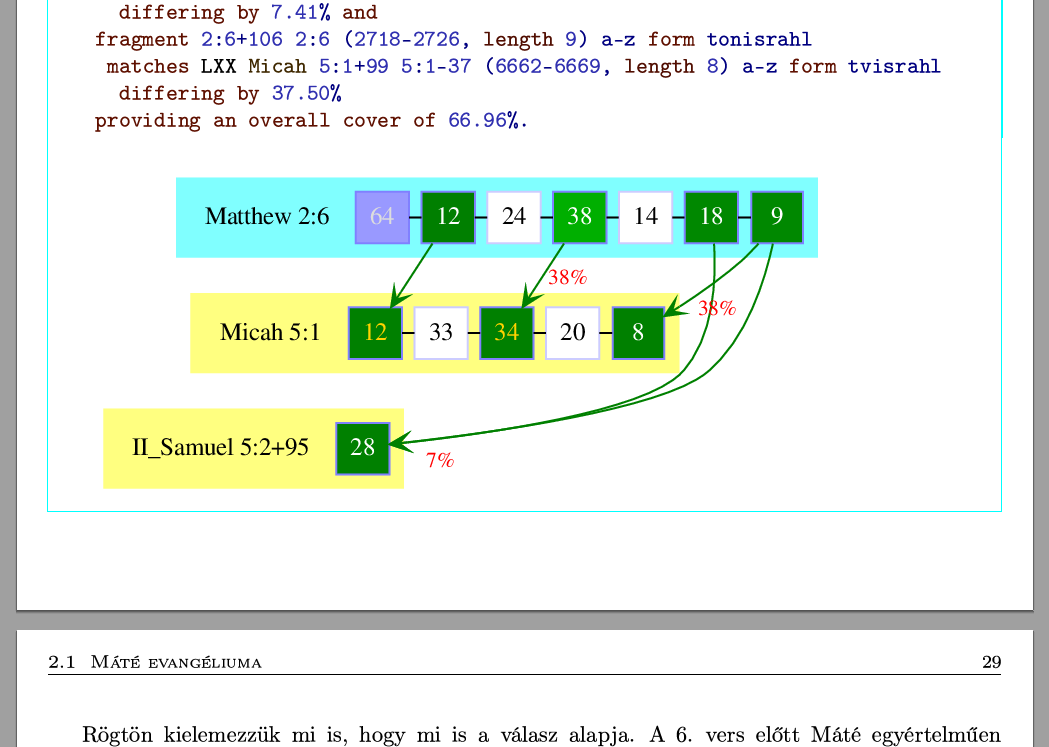
To communicate the feeling how
the interactive book looks like, here is a screenshot taken in TeXmacs 2.1.5:
Entries on topic technical developments
- Embedding realgeom in GeoGebra (9 July 2021)
- Web version of Tarski (1 October 2021)
- Developing Giac with Qt Creator on Windows (24 January 2022)
- Compiling Giac via MSYS2/CLANG32 (2 April 2022)
- Terminals on the web (28 June 2022)
- Torus puzzle (15 April 2023)
- Tube amoeba (16 April 2023)
- XaoS in WebAssembly (30 August 2023)
- Debut of GNU Aris in WebAssembly (11 November 2023)
- JGEX 0.81 (in Hungarian) (10 December 2023)
- xaos.app (2 January 2024)
- Compiling and running bibref-qt on Wine (22 August 2024)
- Treasure of Count Goldenwald (6 January 2025)
- Developing C++ code for desktop and web with cmake (7 March 2025)
- Statement analysis in bibref (8 March 2025)
- An online Qt GUI version of bibref (20 April 2025)
- JGEX via CheerpJ (5 July 2025)
- Connecting ISBTF's LXX-NT database with bibref (10 July 2025)
- GraphViz as a WebAssembly module (13 August 2025)
- bibref: Support for LXX 3.2 and StatResGNT 1.4, and some technical infos (23 December 2025)
- Towards reproducible builds via Docker (15 January 2026)
- TeXmacs plugins (9 March 2026)
- Interactive books with TeXmacs via Docker (27 March 2026)
- Syntax highlighting in TeXmacs (13 August 2026)
- 30 Years of XaoS (29 September 2026)

|
Zoltán Kovács Linz School of Education Johannes Kepler University Altenberger Strasse 69 A-4040 Linz |